Car Dashboard Widgets - HiCar
88 TechMaps & Navigation
4.469.00 Reviews
- Version
- 1.2.2
- Installs
- 10.00K
- Age Rating
- Everyone
Screenshots
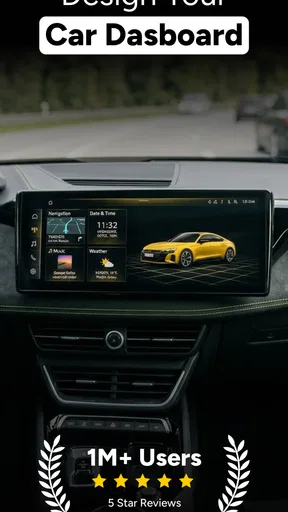
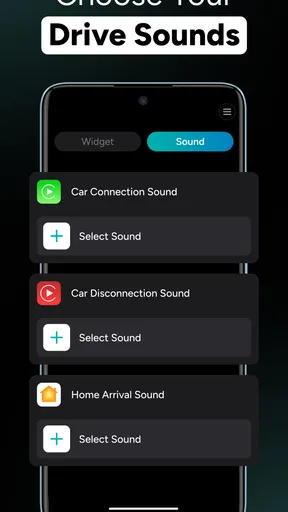
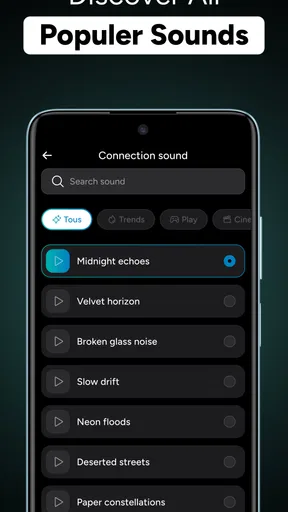
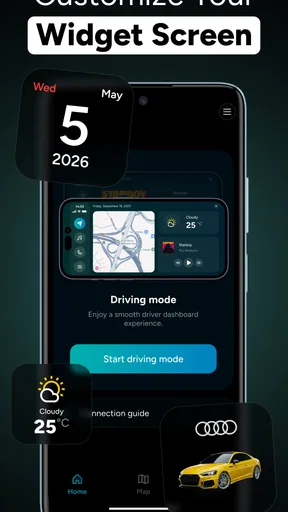
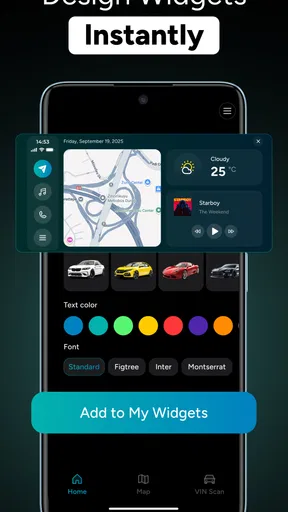
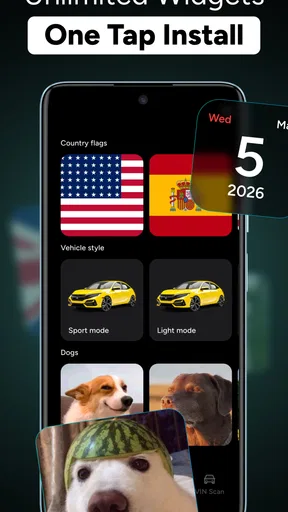
Our Review of Car Dashboard Widgets - HiCar
 Analysis by Appyee
I approached Car Dashboard Widgets - HiCar as a small personalization tool rather than a replacement for a full navigation system. That distinction matters. Its purpose is to make the driving experience feel more like your own by bringing custom startup sounds and widgets into the car-dashboard setting. If you want a familiar route planner, live traffic service, or a complete infotainment platform, this is not trying to be that. If you care about how your dashboard feels every time you start a drive, it has a more focused appeal.
The app comes from 88 Tech and sits in the Maps & Navigation category, although its practical role is closer to dashboard customization than turn-by-turn navigation. I found that useful to keep in mind before judging it. The strongest reason to install it is not that it gives you another map; it is that it lets you personalize the moment before a journey begins. That can be surprisingly pleasant for people who spend a lot of time in the car and want their setup to feel less generic.
What to consider before choosing HiCar
My first decision criterion would be your actual goal. Are you trying to get directions, avoid traffic, find parking, or plan a route? A conventional navigation app is the better fit for those jobs. Are you looking for a more personal dashboard experience, with a custom sound and useful at-a-glance elements? That is where HiCar becomes more interesting.
The second question is how much control you want. A dedicated navigation app usually earns its place by solving a practical problem during a trip. HiCar is more about the surrounding experience: what appears on the dashboard and how the drive begins. That means its value depends heavily on your habits. Someone who starts the car several times a day may notice the customization more than someone who drives only occasionally.
I would also think about simplicity. Personalization apps can be enjoyable when they reduce repetition, but they can become irritating if setup takes longer than the benefit justifies. With this app, I would begin with one startup sound and only the widgets I expect to glance at regularly. A crowded dashboard can defeat the point of having a cleaner, more personal driving interface.
Device compatibility is another sensible checkpoint. The app supports Android 8.0 and newer, which covers a broad range of devices, but the experience can still vary depending on the phone, car display, and the way the dashboard environment is used. I would test the basic setup before spending money on optional items. That approach keeps the decision practical rather than emotional.
There is also a safety criterion that should come before customization. Widgets should support quick glances, not encourage interaction while moving. I would configure everything before leaving, keep the display uncluttered, and treat the app as a preparation tool rather than something to explore during a drive. The best dashboard setup is the one that becomes familiar enough to require almost no attention.
The small details that make personalization useful
One of the less obvious strengths of a startup-sound feature is that it can create a clear transition between ordinary phone use and driving time. I found that more useful when the sound was short and recognizable rather than dramatic. A brief cue can confirm that the dashboard experience has started without becoming another distraction.
Widgets can also be chosen with a workflow in mind instead of being added simply because they are available. I would place the information I check before moving off in the most visible area, then leave secondary information out. This is a better use of the app than treating the dashboard like a home screen that needs to show everything.
A practical tip is to create a setup for your most common journey rather than trying to design a perfect layout for every possible trip. For example, if I were using the app for a daily commute, I would prioritize a calm startup sound and a compact arrangement that I can recognize immediately. For longer drives, I might prefer a different feel, but I would still avoid changing the layout while already on the road.
Where HiCar stands out
The clearest advantage is focus. Many navigation products are built around maps, destinations, traffic, and route guidance. HiCar approaches the car from the personalization side. That gives it a different kind of usefulness: it can make a repeated routine feel more deliberate without asking you to replace the navigation tools you already understand.
I also like that the concept is easy to explain. You choose the kind of dashboard experience you want, add a personal touch through startup audio, and use widgets to shape what you see. There is no need to adopt a completely new way of planning journeys just to enjoy a little customization. For a driver who already has a preferred navigation app, that separation may be exactly the point.
In everyday use, I can imagine opening the app before a morning commute, checking that the preferred dashboard arrangement is ready, and then leaving it alone. The benefit is subtle rather than dramatic, but repeated small improvements can matter when a routine happens every day. The app works best when it fades into the background after setup.
Another useful angle is personal identity. A standard car interface often feels fixed, even when the phone connected to it is highly personalized. Custom startup sounds and widgets give the dashboard a little more character. That will not matter to everyone, but for people who enjoy tailoring their devices, it is a genuine reason to try the app.
The current release is version 1.2.2, and I would treat that as a reason to keep expectations measured. The app has a focused purpose, but it is not the sort of tool I would install expecting the depth of a mature navigation suite. Its appeal comes from doing a narrower job in a way that feels personal.
A realistic daily scenario
Imagine a driver leaving for work on a familiar route. The route itself does not require much thought, so the main value is having a consistent dashboard ready at the start. A short custom sound marks the beginning of the drive, while selected widgets provide the information the driver wants to see before pulling away. After that, the driver can switch to the usual navigation or audio tools when needed.
That scenario shows both the strength and the boundary of HiCar. It can improve the beginning of a routine, but it does not replace the services that handle changing traffic or unfamiliar roads. I would use it alongside a trusted navigation option, not instead of one. The app makes the dashboard more personal; it does not turn a familiar route into a complete navigation ecosystem.
There is a second scenario where it may appeal: a household with more than one driver or a person who uses different cars. A personalized dashboard can make the experience feel more consistent from one drive to the next. The practical benefit depends on how the app handles your particular setup, so I would test the switching process early. If changing arrangements becomes tedious, the personalization may not be worth maintaining.
What the ratings suggest, and what they do not prove
The app holds a 4.4 average from around 549 ratings, with about 69 written reviews, and has passed 10K installs. Those figures suggest that the idea has found an audience, but I would not treat them as proof that every phone-and-car combination will behave identically. Personalization tools are especially sensitive to individual setups, so the written experiences are more useful when they match your device and driving habits.
I would read feedback looking for practical clues: whether people find the setup intuitive, whether the widgets remain useful after the novelty fades, and whether the startup sound fits naturally into daily driving. Those questions matter more to me than a general statement that the app is enjoyable. A high rating can tell you that the concept works for many users; it cannot decide whether the concept fits your routine.
When another type of app may be better
If your priority is reliable route guidance, I would choose a dedicated navigation app first. Those products are designed around destinations, maps, traffic information, rerouting, and search. HiCar belongs beside that category rather than competing with it directly. Installing it will not remove the need for a navigation service when you are driving somewhere unfamiliar.
If you mainly want a clean car interface with minimal setup, your phone or vehicle may already provide enough. In that case, HiCar could feel like an extra layer. The app is most convincing when the ability to personalize the startup experience and dashboard is itself important to you. Without that interest, the standard interface may be simpler and perfectly adequate.
Music and audio-focused tools may also suit you better if the main thing you want to control in the car is playback. HiCar’s custom sound can add personality, but it should not be confused with a full audio-management solution. Likewise, a vehicle companion app may be more appropriate if you need car-specific controls or information. I would choose according to the problem, not according to the broad Maps & Navigation label.
There is a trade-off between flexibility and consistency. A specialized dashboard app can offer a more personal presentation, while an established navigation platform may provide a smoother all-in-one routine. If you dislike maintaining several apps, the latter may win. If you enjoy choosing how your dashboard looks and sounds, HiCar’s narrower focus becomes an advantage rather than a weakness.
Cost, optional purchases, and the cost of switching
HiCar is free to install, which makes trying the basic experience relatively straightforward. It is listed for Everyone, so its presentation is not aimed at a restricted age group. However, optional in-app purchases range from $4.99 to $39.99 per item. I would not buy anything immediately. First I would confirm that the core dashboard workflow feels natural, that the widgets are genuinely useful, and that the app fits the way I use my car.
The financial cost is only one part of switching. There is also the time spent arranging a dashboard, deciding which sound feels right, and learning whether the setup remains convenient after the first few drives. A free app can still be a poor choice if it adds daily friction. My approach would be to use the simplest configuration for several journeys before considering any optional purchase.
Another switching cost is habit. If you already open a familiar navigation app automatically, HiCar may not become your main driving app at all. That is not necessarily a problem. It can occupy a supporting role, but you should be comfortable with that role. I would avoid replacing a dependable navigation workflow simply to gain a more personalized startup experience.
There is also a useful way to limit commitment: change one element at a time. Start with the dashboard arrangement, then test the startup sound, then decide whether additional customization improves anything. This makes it easier to identify what you actually value and prevents a complicated setup from becoming difficult to troubleshoot.
My recommendation after weighing the trade-offs
I recommend HiCar to drivers who enjoy personalizing their devices and want their car dashboard to feel less standard. It is especially suitable for people with repetitive commutes, drivers who like a consistent pre-drive routine, and anyone who sees custom sounds and widgets as meaningful rather than decorative. The free entry point makes it reasonable to test without committing to a purchase.
I would skip it if you are searching for a complete navigation replacement, advanced route planning, or a single app that handles every part of the journey. In those cases, a dedicated navigation platform or a vehicle-specific companion will probably serve you better. HiCar’s value is strongest when you already have those needs covered and want to improve the surrounding dashboard experience.
My most important advice is to configure it while parked and keep the result restrained. Choose only the widgets you can understand at a glance, use a startup sound that confirms rather than demands attention, and judge the app after several ordinary drives instead of one enthusiastic setup session. That is when the difference between useful personalization and visual clutter becomes clear.
Overall, I see this as a focused Android app from 88 Tech with a clear niche. The 4.4 average and growing install base show that the idea resonates, but the real question is personal: do you want your dashboard to express more of your preferences? If the answer is yes, Car Dashboard Widgets - HiCar is worth trying as a companion to your existing navigation tools. If the answer is no, its extra layer may not earn a permanent place in your driving routine.
Verdict
Strengths of Car Dashboard Widgets - HiCar
- Provides quick access to essential car information while driving.
- Clean dashboard-style layout is easy to understand at a glance.
- Useful widget format minimizes the need to open the full app.
- Can make compatible Android devices feel more car-focused.
- Helps keep commonly used driving tools conveniently organized.
Limitations of Car Dashboard Widgets - HiCar
- Widget compatibility may vary between Android versions and launchers.
- Some features may require permissions that users may find intrusive.
- The interface may not suit drivers who prefer a minimalist dashboard.
- Battery use can increase when location or live data features stay active.
- Limited customization may disappoint users seeking a fully personalized layout.
Other Releases by 88 Tech
View All
AI Video Generator - OpenVideo
Art & Design4.4
Similar Picks in This Category
View All
Uber - Request a ride
Uber Technologies, Inc.4.7


inDrive. Rides with fair fares
® SUOL INNOVATIONS LTD4.8

Yandex Go: Taxi Food Delivery
Mikromobilnost LLC Belgrade4.8

Bolt: Request a Ride
Bolt Technology4.8

Rapido: Bike-Taxi, Auto & Cabs
Rapido Bike Taxi4.8
Frequently Asked Questions
What is Car Dashboard Widgets - HiCar, and what does it do?
Car Dashboard Widgets - HiCar is designed to turn an Android device into a customizable in-car dashboard. It can place useful information and shortcuts on one screen, such as navigation access, music controls, weather details, time, battery status, and other widgets supported by the app. The goal is to make common driving-related actions easier to reach while reducing the need to switch between separate applications.
Can Car Dashboard Widgets - HiCar replace Android Auto or Apple CarPlay?
No. Car Dashboard Widgets - HiCar should generally be considered a dashboard interface and widget tool rather than a complete replacement for Android Auto or Apple CarPlay. It may organize shortcuts and information on your phone, but it does not automatically provide the same vehicle integration, voice features, steering-wheel controls, or built-in compatibility offered by official car platforms. Check your vehicle and phone requirements before relying on it for driving.
Is Car Dashboard Widgets - HiCar compatible with every Android phone and car?
Compatibility depends primarily on the Android version, screen size, launcher behavior, permissions, and the way you plan to mount or connect the phone in your vehicle. The app does not require every car to support a specific infotainment system because it can work as a phone-based dashboard, but some widgets or functions may behave differently across devices. Review the Google Play listing and test it while parked before regular use.
Does Car Dashboard Widgets - HiCar require an internet connection or location access?
The basic dashboard layout and many on-screen shortcuts may work without a constant internet connection, but individual features can depend on other services. Navigation, live traffic, online weather, streaming music, and updated map information normally require internet access and may also request location permission. Only grant permissions that match the features you intend to use, and remember that mobile data usage can increase during long trips.
Is Car Dashboard Widgets - HiCar safe to use while driving?
The app can make frequently used information more visible, but it should not be treated as a distraction-free driving solution. Configure the dashboard before starting your trip, use large and simple widgets, and avoid tapping, reading lengthy content, or changing settings while the vehicle is moving. Navigation and music should be controlled through voice commands or stopped safely. Always follow local traffic laws and keep your attention on the road.
